





Ship a 9:16 Master: Production Ready Vertical Video Workflow for Brands
Vertical video belongs in your media mix whenever mobile viewing dominates your audience, which for most consumer and B2C brands in 2026 means every campaign. The immediate move: build a 9:16 master, caption it properly, then derive square and landscape variants for the placements that need them. Run a placement-aware A/B test before you scale spend, because the format’s lift depends on execution, not just orientation.
TL;DR:
- Vertical videos should be shot in 1080×1920 resolution, preferably in 4K for flexibility in repurposing into different aspect ratios.
- Creating engaging vertical content requires a strong hook within the first three seconds, featuring movement or a question to retain viewers.
- Safe areas must be kept free of UI elements, with key captions and logos centered and burned into the video to maximize readability on sound-off views.
- Always test safe-area markers on actual mobile devices before finalizing, as screen size and UI overlays can impact the placement of critical information.
- Measuring vertical video performance through audience-specific metrics and platform benchmarks ensures campaigns are optimized for relevance and format.
Table of Contents
- Why Vertical Video Matters for Brands
- Where Should Brands Use Vertical Video?
- What Are the Technical Specs for Vertical Video?
- How Do You Structure a Vertical Video That Stops the Scroll?
- How Do You Produce and Repurpose Vertical Video Efficiently?
- How Should You Measure and Test Vertical Video Performance?
- Three Vertical Video Concepts to Brief This Week
- Briefing a Vertical Shoot for Authentic Brand Storytelling
- What Legal and Copyright Issues Apply to Vertical Video?
- What Mistakes Do Brands Make With Vertical Video?
- What the Research Actually Tells Brand Teams to Prioritize
- Get Vertical Content Shot Right the First Time
- Sources
- FAQ
Why Vertical Video Matters for Brands
The case for vertical video isn’t just habit. A peer-reviewed study in the Journal of Interactive Marketing found that mobile vertical video ads outperform horizontal ones on interest and engagement, and traced part of the effect to processing fluency. People hold their phones vertically. Full-screen portrait video removes the friction of rotating a device or squinting at a letterboxed clip, so the message lands with less effort.
Google reports that adding a vertical asset to a landscape-only Video View ad group lifted Shorts view-through rate by over 40%, while Demand Gen campaigns saw Shorts conversions rise by more than 35% and Video Reach viewability climb over 45%.
That research also found the effect is stronger among Generation Z, so if your media plan skews younger, vertical isn’t optional polish. It’s the format your audience already expects, and testing by age cohort will likely show the gap widening rather than closing.
Where Should Brands Use Vertical Video?
Vertical creative now lives across nearly every major placement, but each context has its own rules for how the frame behaves.
- YouTube Shorts and TikTok run pure fullscreen 9:16, no letterboxing, so any unused edge space is wasted real estate.
- Instagram Reels and Stories share the fullscreen behavior but overlay usernames, captions, and sticker zones near the top and bottom.
- Snapchat treats vertical as native and rewards fast pacing over polished production.
- Demand Gen, App campaigns, and Performance Max accept vertical alongside square and landscape assets, and Google’s own guidance recommends supplying multiple aspect ratios rather than betting on one.
- Video Reach and Video View campaigns benefit from vertical additions even when the original buy was landscape only.
- Product pages and shoppable video are a growing use case; Shopify recommends vertical product demos on-site, not just in social feeds.
Treat vertical as a portfolio requirement across paid and owned channels, not a one-off social experiment.
What Are the Technical Specs for Vertical Video?
Getting the export settings right saves a production team from re-shoots. The baseline spec for a vertical master is a 9:16 frame at 1080×1920, though shooting at 4K gives you room to crop for square or landscape without losing sharpness. MP4 with H.264 encoding remains the safest universal file type across ad platforms.
- Resolution: 1080×1920 minimum; 2160×3840 (4K) recommended for masters you plan to repurpose.
- Safe areas: keep logos, captions, and calls to action clear of the top 15% and bottom 20% of frame, where platform UI (usernames, captions, share icons) typically sits.
- Center the action: framing your subject centrally protects the shot when it gets cropped down to 1:1 or 16:9 later.
- Captions: burn in readable, high-contrast captions, since most vertical viewing happens with sound off until a viewer opts in.
- On-screen text: keep it short. A caption that takes three seconds to read on a laptop takes longer on a phone held at arm’s length.
Pro Tip: Test your safe-area markers on an actual phone screen before you sign off on a cut. What looks fine on a 27-inch monitor can crowd a UI overlay the moment it’s viewed on a 6-inch display.
How Do You Structure a Vertical Video That Stops the Scroll?
The first one to three seconds decide whether a viewer keeps watching or swipes past. Open with movement, a direct question, or a visual contrast, never a slow logo fade or a static establishing shot. Vertical video punishes a slow build the way horizontal TV spots never had to worry about.
Keep the story simple. One protagonist or one product, one clear tension, one payoff. Brand stories that try to juggle multiple characters or subplots in fifteen seconds tend to lose viewers by the second beat.
- Hook (0 to 3 seconds): movement, a question, or an unexpected visual.
- Body: a single clear message, no competing claims.
- Branding: a light cue early (a logo watermark, a color palette), a full brand moment in the outro.
- CTA: match the ask to the objective. Awareness campaigns can close soft (“Learn more”); conversion campaigns need a direct, specific action (“Shop now,” “Book today”).
Branding too early and too loudly reads as an ad before the viewer has any reason to care. Save the full reveal for the outro, once you’ve earned attention.
How Do You Produce and Repurpose Vertical Video Efficiently?
Decide your destination before you shoot. If vertical is the only place this asset runs, shoot vertical-first: it produces more native-feeling footage than cropping a horizontal file after the fact, according to Shopify’s production guidance. If you need landscape and square variants too, capture a high-resolution centered master so every crop keeps the subject in frame.
- Storyboard the 9:16 edit first, marking safe areas for captions and platform UI before a single frame is shot.
- Build an asset matrix naming every deliverable (vertical master, square crop, 16:9 crop, captioned and uncaptioned versions) so post-production knows exactly what to hand back.
- Shoot centered, in 4K where possible, treating the frame as a canvas you’ll crop rather than a fixed final composition.
- Export the vertical master first, then derive the 1:1 and 16:9 variants, keeping bitrate high and text layers editable for late changes.
Pro Tip: Rehearse the opening three seconds multiple times and record a 5 to 10 second raw lead-in on every take. That buffer gives editors room to adjust pacing without reshooting a hook that almost worked.
How Should You Measure and Test Vertical Video Performance?
Treat vertical as a hypothesis, not an assumption. Run the same creative message across ratios and audience segments, then compare placement-aware results rather than pooling everything into one number.
Google’s platform-reported benchmarks are a useful baseline for what to expect, not a guarantee: adding vertical assets has produced Shorts conversions up more than 35%, view-through rate gains over 40%, and viewability increases above 45% in the company’s own reporting. Treat those figures as directional targets for your own tests, not fixed outcomes.
- Awareness campaigns: track ad recall and viewability.
- Consideration campaigns: track view-through rate and average watch time.
- Conversion campaigns: track click-through rate and conversion rate.
Give each test enough duration and audience volume to move past early noise, generally a full campaign cycle rather than a 48-hour snapshot, before you draw conclusions.
Three Vertical Video Concepts to Brief This Week
You don’t need a six-figure production budget to start testing. Three formats travel well across most brand categories:
- 15-second product detail demo: open with a 3-second visual hook (texture, movement, a surprising close-up), caption the core benefit on screen, and close with a product-page CTA.
- 20 to 30-second founder micro-story: one protagonist, one moment of tension, one payoff, ending on a soft CTA like “Learn more” rather than a hard sell.
- UGC remix: a short testimonial clip paired with a trending or branded sound, with a hashtag prompt that invites your audience to submit their own version.
Brief all three with the same safe-area and captioning rules, then let performance data tell you which concept earns a bigger budget next quarter.
Briefing a Vertical Shoot for Authentic Brand Storytelling
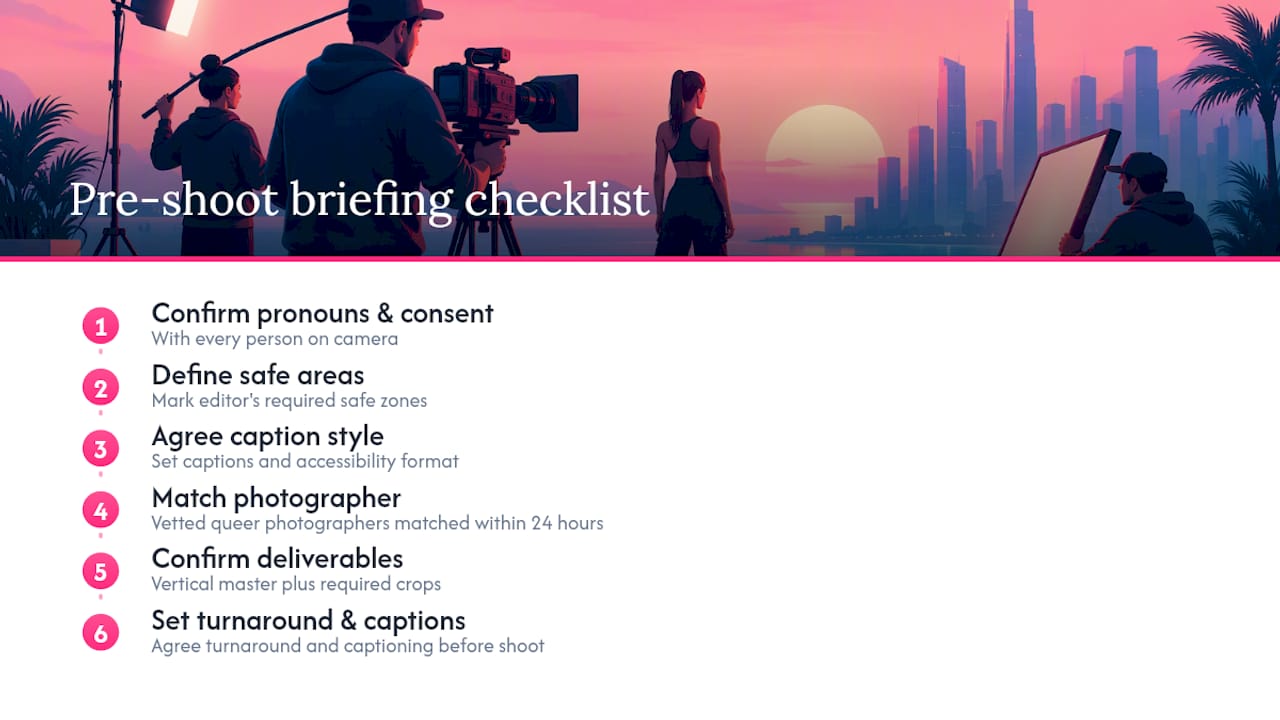
A strong vertical brief starts before the camera rolls. Confirm pronouns and consent language with every person on camera, write a shot list that names the safe areas your editor needs, and agree on caption style up front so accessibility isn’t an afterthought.
Queer works with vetted queer photographers matched to a brief within 24 hours, which suits brand teams that want representation built into production rather than added in post. A tight checklist helps: confirm deliverables (vertical master plus crops), agree turnaround, and specify captioning needs before the shoot day, not after.
What Legal and Copyright Issues Apply to Vertical Video?
Vertical video carries the same core copyright rules as any other video format, but a few areas deserve specific attention because of how vertical content gets sourced and repurposed.
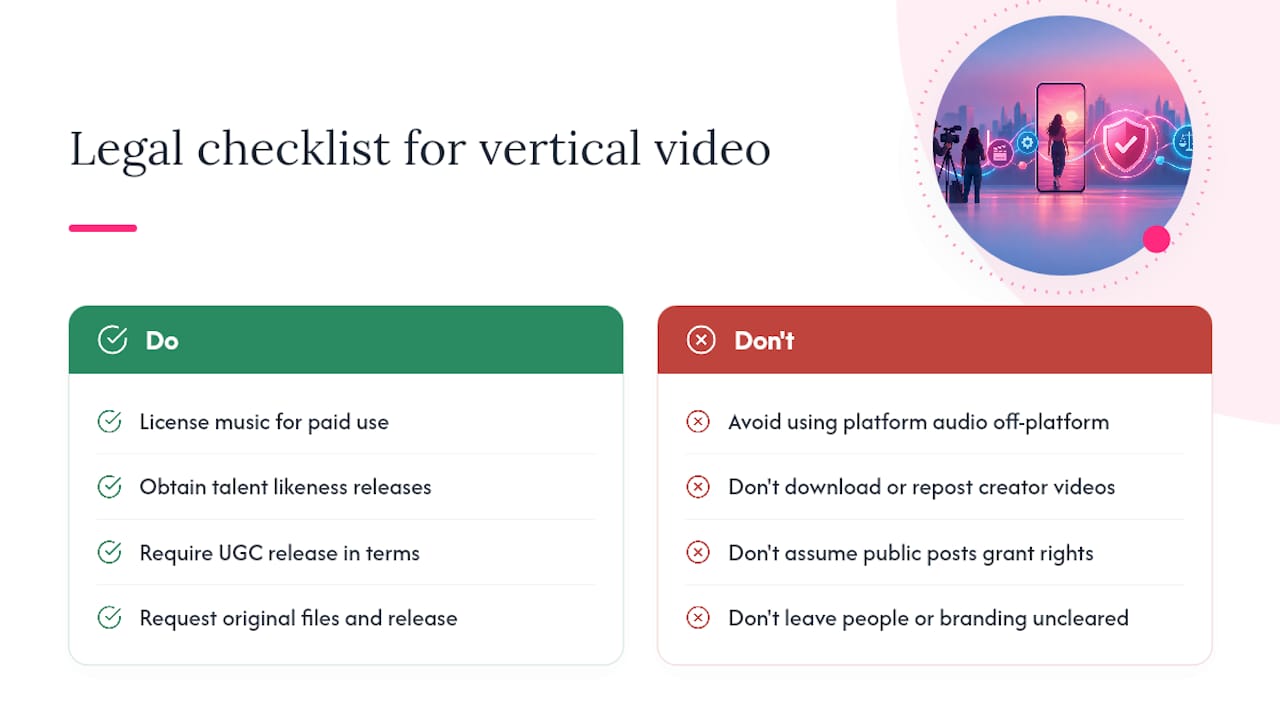
Music and trending sounds. A huge share of vertical creative, especially UGC-style content, borrows a trending audio clip. Platform-native sound libraries (TikTok’s, Instagram’s) typically carry a license for use on that platform only. Reusing that same clip in a paid ad running outside the platform, or in a landscape cutdown for a different channel, can trigger a rights claim. Clear music licensing separately for any paid or owned-channel use.
Talent and likeness releases. Vertical formats often feature real people, employees, customers, or UGC creators, more prominently and for longer than a fifteen-second landscape cutaway once did. Get a signed release covering every platform and duration you intend to run the footage, not just the one you shot it for.
UGC repurposing rights. If your campaign invites customer-submitted vertical clips, your hashtag or contest terms need explicit language granting your brand permission to repost, edit, and run that content as paid media. A public post is not automatic permission to boost it.
Platform terms of service. Downloading a creator’s vertical video from one platform to repost as your own brand asset, even with credit, usually violates that platform’s terms and can violate the creator’s copyright separately. Always request the original file and a written release.
Location and property releases. Vertical shoots often happen in tighter public or retail spaces than a traditional video shoot. Confirm you have permission to film on the property and that any recognizable branding, artwork, or bystanders in frame are cleared or blurred.
What Mistakes Do Brands Make With Vertical Video?
Most vertical video failures aren’t about the format. They’re about treating it as an afterthought.
Cropping a horizontal master and calling it done. A center-weighted crop from a widescreen shoot often cuts off the subject’s head, hands, or the product itself, because the original composition was never built for a tall frame. Shoot vertical-first, or at minimum shoot centered and wide enough to crop safely.
Burying the hook. Brand teams used to :30 TV spots sometimes open vertical creative with a slow logo animation or an establishing shot. On a mobile feed, that’s a guaranteed skip. The first three seconds carry the entire weight of retention.
Ignoring platform-specific safe areas. A caption or CTA that looks fine in the raw export can sit directly behind a username, a share icon, or a comment box once it’s live. Always preview on the actual placement before launch.
Skipping captions. Sound-off viewing is the default on most feeds. A brand message that depends entirely on voiceover audio loses most of its intended audience before the point ever lands.
Treating vertical as “the social version.” Vertical deserves its own strategic brief, not a leftover crop from the “real” campaign. Budgeting it as an afterthought shows in the finished cut, and audiences notice the difference between a native asset and a repurposed one.
Skipping the test. Assuming vertical will outperform without measuring it against your specific audience and objective wastes the format’s biggest advantage: it’s cheap enough to test properly before scaling.
What the Research Actually Tells Brand Teams to Prioritize
The evidence here points somewhere more specific than “use vertical video.” It points to relevance plus format. The Decathlon case study that Think with Google published didn’t just add a vertical crop, it customized creative to audience interest and saw ad recall jump 72.7% alongside a 51% lift in return on ad spend. Format did some of the work. Relevance did more.
Where conventional advice falls short is treating orientation as the whole strategy. Plenty of brand teams ship a 9:16 crop of their hero landscape ad, check the box, and wonder why performance barely moves. The processing-fluency research is clear that vertical reduces viewing effort, but effort reduction only helps if the message underneath was worth the reduced effort to begin with.
Prioritize the brief before the aspect ratio. Get the hook, the single message, and the safe-area planning right, and the format upgrade compounds instead of just checking a spec sheet requirement.
— Emmet
Get Vertical Content Shot Right the First Time
There are other routes to vertical content: in-house phone shoots, freelance marketplaces, generic stock footage sites. Most of them make you choose between speed and originality. Queer.Photo doesn’t ask you to choose. Every photographer on the roster is vetted and personally matched to your brief, usually within 24 hours, and every frame is shot fresh, never stock, never AI generated.
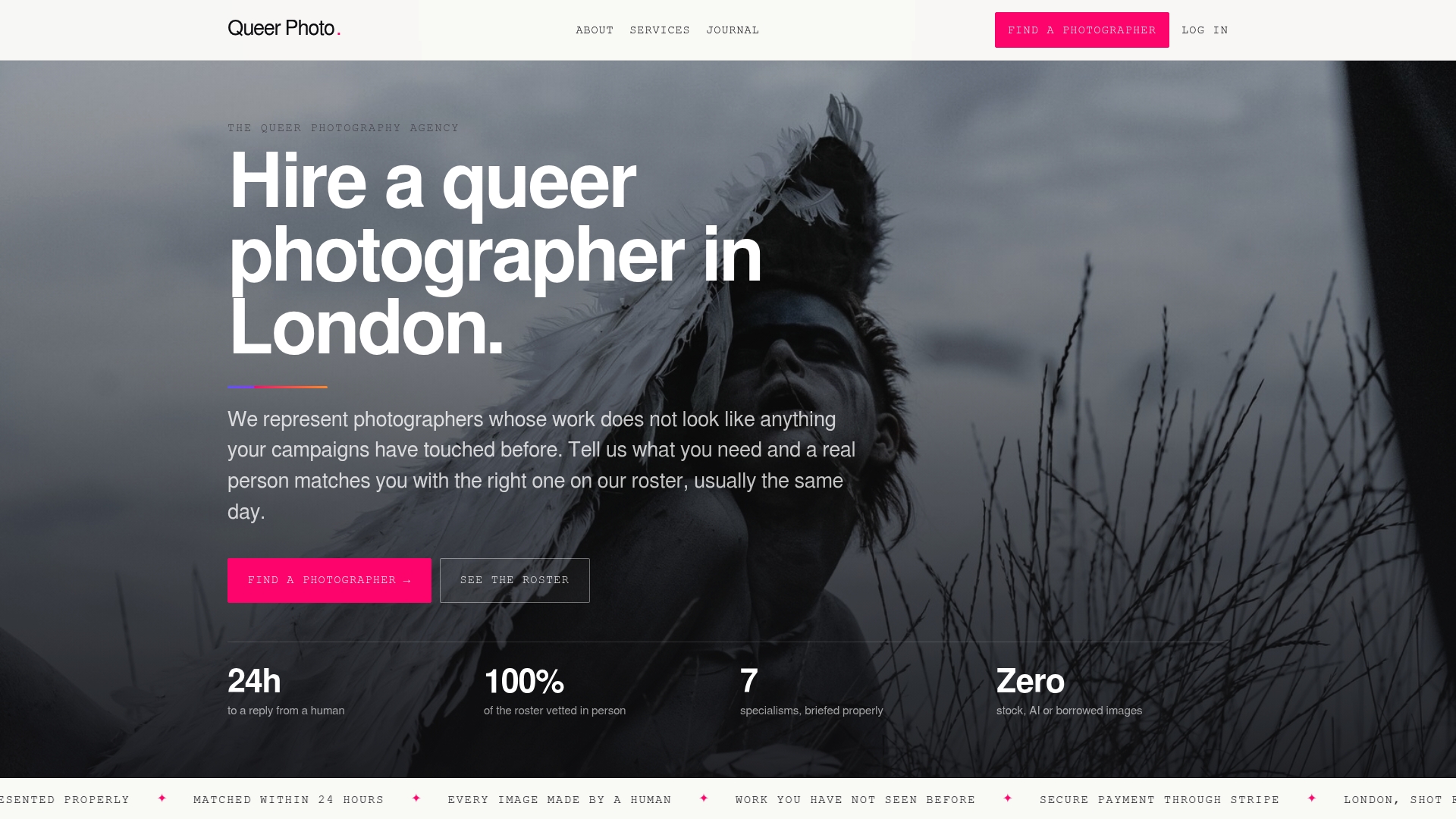
If your next campaign needs a vertical-first shoot with real subjects and inclusive casting handled correctly from the first call, a content day is built exactly for that: one booking, multiple deliverables, a matched photographer who understands pronouns and consent as part of the brief, not an afterthought. Packages like Personal Brand start from £200, and full video services are listed alongside stills so you can plan one shoot day around both. Check current packages and book your date on the pricing page.
Sources
- Use square and vertical video to engage mobile customers – Google Ads Help
- This Way Up: The Effectiveness of Mobile Vertical Video Marketing
- How To Use Vertical Videos for Social and Website Content (2026) – Shopify
- Create vertical videos for social media | Adobe
- How Decathlon boosted conversions with customized video ads (Think with Google case study)
FAQ
Is 1080×1920 a Vertical Video?
Yes, 1080×1920 is the standard resolution for a 9:16 vertical video, the same aspect ratio used by Instagram Stories, TikTok, and YouTube Shorts. It’s the recommended minimum for a vertical master, though shooting in 4K (2160×3840) gives more flexibility when repurposing footage into square or landscape crops.
How Do I Make a Vertical Video?
Shoot with your camera or phone held vertically, framing your subject centrally so the shot survives any later cropping. Export at 1080×1920 or higher, add burned-in captions since most vertical viewing happens with sound off, and keep key text clear of the top and bottom UI safe areas.
Can You Give an Example of a Vertical Video?
A 15-second product demo that opens with a close-up hook, shows the product in use with on-screen captions, and ends on a product-page CTA is a common, effective vertical format. A brand founder’s 20 to 30-second micro-story, one person, one moment of tension, one payoff, is another format that performs well across Reels, Shorts, and TikTok.
What Is the Ideal Size for a Vertical Video?
The ideal export is 1080×1920 at 9:16, matching what Shorts, Reels, and Stories expect natively. For campaigns that also need square or landscape variants, Google’s own guidance recommends supplying multiple aspect ratios rather than forcing one ratio across every placement.
Does Queer.Photo Produce Vertical Video for Brands?
Yes. Queer.Photo matches brand clients with vetted queer photographers and videographers for content days and video projects, typically within 24 hours of a brief. Current video packages and pricing are listed on the services page.